

A new address for every sign-up, named after the person who made it. Every code lands in one dashboard, ready to copy.
Okodo demo: addresses yc1, yc2 and yc3 at apollo.yourdomain.com are generated, then a verification email arrives and its code 482913 is ready to copy.
The problem
Sign-up mail has no good home.
You have probably tried these. Each one breaks once a team signs up for enough tools.
you@company.com
Sign-up mail buries real mail, and one address cannot serve many accounts.
name+tag@
Many services reject or strip it, and it reveals your real inbox.
temp mail site
Public and often blocked. Anyone can read the codes.
a mailbox per account
Expensive, and slow to manage.
inbox, phone, colleague
Codes end up scattered across all three.
Addresses
Named after the person. Numbered forever.
Yatharth Chauhan gets yc1@, yc2@, yc3@. One click makes the next one. Numbering has no limit.
Safe when several people generate at the same time
How it works
From a new address to a copied code.
Most people only ever press two buttons: Generate email and Copy code.
Generate
One click creates the next address in sequence, named after the person.Use
Sign up anywhere with it. It is a real address on a real domain, so services accept it.Receive
The message arrives in your private dashboard within seconds.Copy
The one-time code is detected and shown as a large copy button.Retire
Disable the address when you are done. Its mail is rejected and the address stays reserved.
The code, lifted out and ready to copy.
Okodo finds 4 to 8 digit codes in every message. A Codes view lists only the messages that have one.
Example verification email. Okodo reads the message, finds the code 482913 and shows it as a large copy button.
Spam
Lookalike senders land in spam.
Every message is checked against SPF, DKIM and DMARC. Mail that fails is flagged as spam.
The real app, screen by screen.
Mail, Codes and Admin sit in the top bar. Members only see what their role allows.
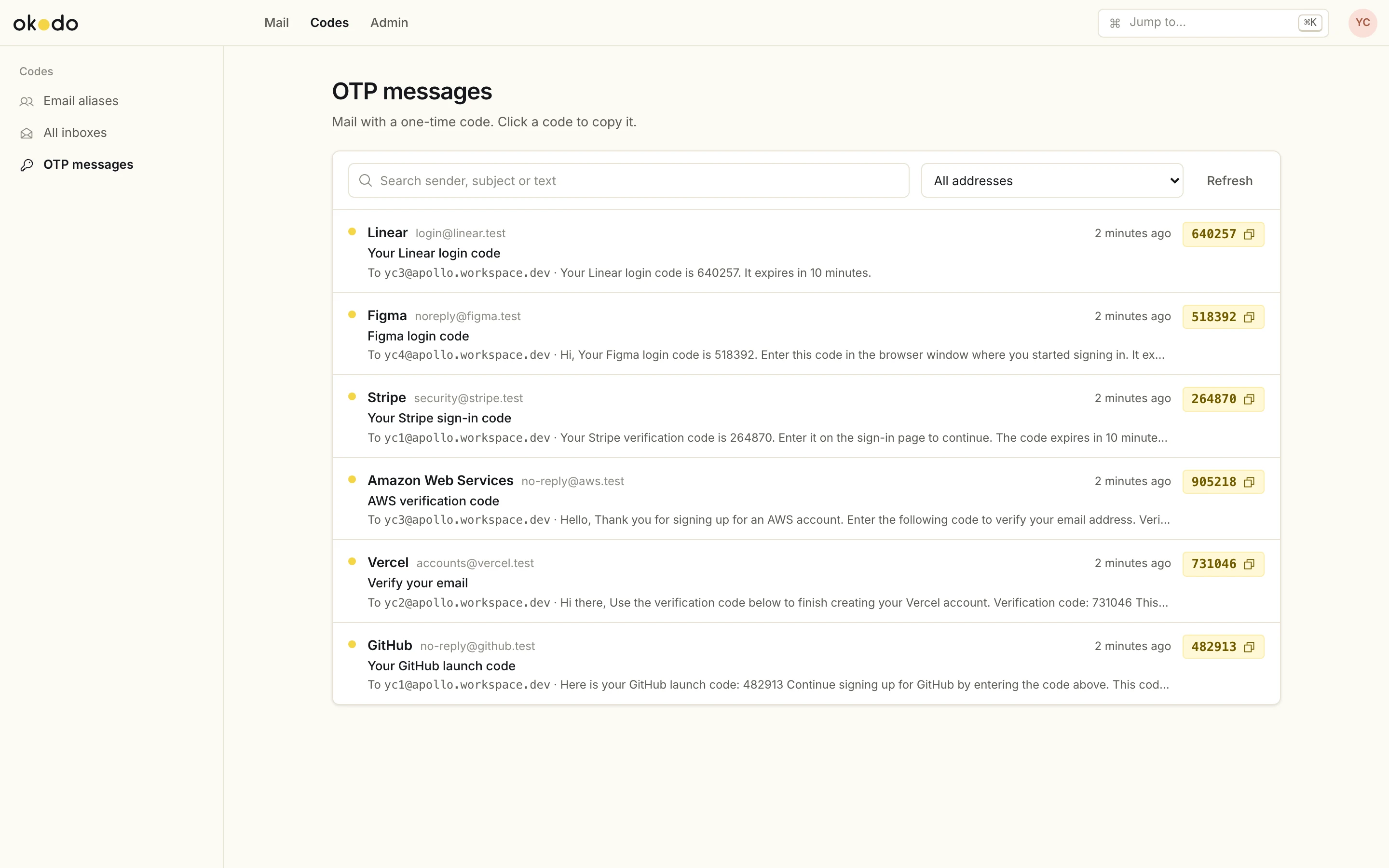
Every one-time code from every generated address in one list, with a copy button next to each code.
Team and access
Codes stay with the people you choose.
Members get two switches
Turn on address generation, codes, both or neither.
Member permissions. Try them.
Three roles
- OwnerEverything
- AdminEverything
- MemberWhat you allow
Personal logins, optional two-factor
Members never open these
- Admin
- Settings
- Domains
- Users
Activity and audit log
Who uses it
Built for people who sign up for a lot.
Startups and small teams
Separate accounts for every tool, trial and environment without buying mailboxes.
Agencies and freelancers
One address per client or project, with codes shared safely with the right people.
QA and developer teams
Real, verifiable email for test accounts and sign-up flow testing.
Operations and support
Member access to generate addresses and read codes, with no admin rights.
Privacy-minded individuals
A different address for every service, without exposing a personal inbox.
Compared
Against the usual fixes.
| Feature | Temporary mail sites | Personal inbox or plus addresses | Paid mailboxes |  Okodo |
|---|---|---|---|---|
| Private | No | Yes | Yes | Yes |
| Own domain | No | Partly | Yes | Yes |
| Unlimited addresses | Yes | Limited | No (cost) | Yes |
| Codes extracted | No | No | No | Yes |
| Team roles | No | No | Yes | Yes |
| Cost | Free | Free | Per mailbox | Free |
Your domain
Your main email stays where it is.
Okodo runs on a subdomain such as apollo.yourdomain.com. Email Routing is turned on there only, and the MX records on your main domain are never changed.
yourdomain.com
apollo.yourdomain.com
Running cost
₹0a month
One Worker and one D1 database in your own Cloudflare account, on the free plan. Okodo only receives mail, so there is no sending cost.
Workers
100,000
requests a day
App, API, each inbound mail and the scheduled jobs
D1
500 MB
per database
Mail stored as text, roughly 50k to 100k messages
Email Routing
25 MiB
per message
Inbound mail, free
Cron triggers
2 of 5
The free plan allows 5 per account. Okodo uses 2.
The one limit
200 Email Routing rules per zone
Each active address uses one rule, so about 199 can be active at once. Disabling or deleting an address frees its rule.
Security
Nothing public returns a code.
- Two-factor sign-in (TOTP)
- Session cookies with a CSRF header and login rate limits
- HTML mail sanitized and shown in a sandboxed frame; scripts stripped, remote images blocked
- No public endpoint returns messages or codes
- Address generation rate-limited to 30 a minute per admin
- Secrets kept in Worker secrets and encrypted settings
Backups
Restore to any minute of the last 7 days.
D1 Time Travel handles the restore. A full export can be taken at any time with Wrangler.
No. Okodo runs on a subdomain such as apollo.yourdomain.com. Email Routing is enabled for that subdomain only, and the MX records on your main domain are never changed.
Would it be unreasonable to see Okodo running before you decide?
We will walk you through the dashboard and how it would sit on a subdomain of yours.
Okodo is built on OpenInbox by its contributors, used under the MIT License.